 English
 简体中文
简体中文
 粵語
粵語
 Arabic
 French
 Spanish
 Portuguese
 Deutsch
 Turkish
 Dutch
Dutch
 Italiano
 Russian
 Romaian
 Portuguese (Brazil)
 Greek
Greek

開發者
探索我們提供的開發者工具
API 版號 1.1
本文檔解釋瞭如何登記、配置和開發您的應用程序,以便您能夠成功使用我們的 API
創建APP
應用接入API需按以下方式登記 APP 控制面板. 登記後會生成一個應用 ID,讓我們知道您的身份,並幫助我們將您的應用與其他應用區分開來.
- 您需要創建一個新的 APP 創建新應用
- 創建應用後,您將獲得您的 app_id 以及 app_secret
使用以下方式登錄
“使用以下方式登錄”系統爲用戶提供了一種快速便捷的方式來創建帳戶並登錄您的應用。我們的“使用以下方式登錄”系統支持兩種場景:身份驗證和請求訪問用戶數據的權限。您可以將“使用以下方式登錄”系統僅用於身份驗證,也可以同時用於身份驗證和數據訪問.
-
開始 OAuth 登錄流程時,您需要使用類似這樣的應用鏈接:
<a href="https://u37.axiox.media/api/oauth?app_id=YOUR_APP_ID">Log in With U37</a>
用戶將被重定向到如下所示的“使用以下方式登錄”頁面
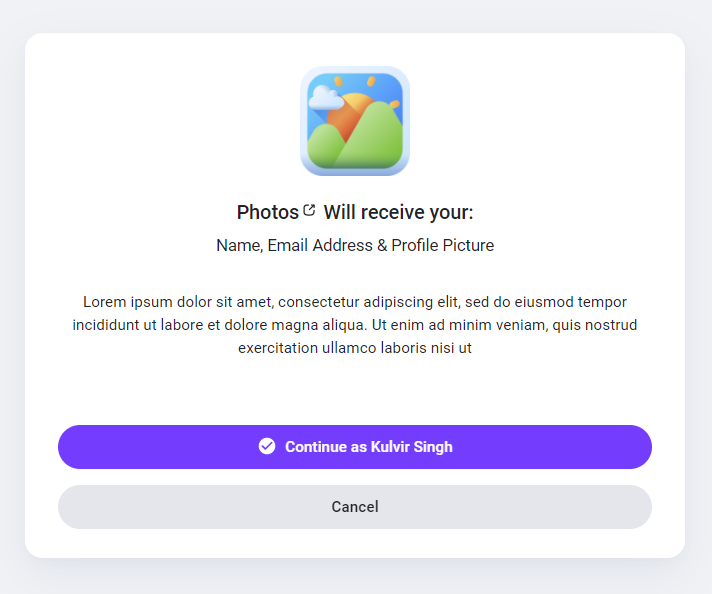
-
用戶接受您的應用後,將被重定向到您的應用重定向 URL auth_key 類似的:
https://mydomain.com/my_redirect_url.php?auth_key=AUTH_KEY
此 auth_key 代碼僅限使用一次,使用後將無法再次使用,您需要重新生成新代碼,並再次將用戶重定向到登錄鏈接.
訪問令牌
一旦您的應用獲得用戶批准,就會彈出“使用以下方式登錄”窗口並返回結果 auth_key 然後就可調用我方API獲取數據,需先授權應用以獲取訪問權限 access_token 您可以按照我們的步驟瞭解如何獲得它.
-
要獲取訪問令牌,請向以下端點發送 HTTP GET 請求:
<?php

$app_id = "YOUR_APP_ID"; // your app id
$app_secret = "YOUR_APP_SECRET"; // your app secret
$auth_key = $_GET['auth_key']; // the returned auth key from previous step

// Prepare the POST data
$postData = [
  'app_id' => $app_id,
  'app_secret' => $app_secret,
  'auth_key' => $auth_key
];

// Initialize cURL
$ch = curl_init('https://u37.axiox.media/api/authorize');

// Set cURL options for POST
curl_setopt($ch, CURLOPT_RETURNTRANSFER, true);
curl_setopt($ch, CURLOPT_POST, true);
curl_setopt($ch, CURLOPT_POSTFIELDS, http_build_query($postData));

// Execute request
$response = curl_exec($ch);

// Check for cURL errors
if (curl_errno($ch)) {
  die('cURL error: ' . curl_error($ch));
}

curl_close($ch);

// Decode the JSON response
$json = json_decode($response, true);

// Use the access token if available
if (!empty($json['access_token'])) {
  $access_token = $json['access_token']; // your access token
}
?>
此 access_token 鏈接有效期一小時,失效需跳轉登錄鏈接重新生成.
API
一旦你得到你的 access_token 即可通過帶下述參數的HTTP GET請求查詢系統數據
| 端點 | 描述 |
|---|---|
| api/get_user_info |
獲取用戶信息 |
你可以像這樣檢索用戶信息
if(!empty($json['access_token'])) {
   $access_token = $json['access_token']; // your access token
   $get = file_get_contents("https://u37.axiox.media/api/get_user_info?access_token=$access_token");
}
結果將是:
{
    "user_info": {
        "user_id": "",
        "user_name": "",
        "user_email": "",
        "user_firstname": "",
        "user_lastname": "",
        "user_gender": "",
        "user_birthdate": "",
        "user_picture": "",
        "user_cover": "",
        "user_registered": "",
        "user_verified": "",
        "user_relationship": "",
        "user_biography": "",
        "user_website": ""
    }
}